If you want to allow Rilheva users to take advantage of additional features such as:
- Tag Writing
- Ewon tag (allows you to read and write even non-historicized tags)
- DataMailbox Sync
- Get the spindle settings
- Ewon Live (activates a continuous broadcast of all tags for 2 minutes)
You need to add the credentials of a user account for your Flexy. The Flexy account must have permission to write tags.
Access the Rilheva portal, click on your Flexy and open the plant configuration (button “gear” on the right).

Click on the Ewon tab and enter the credentials for your Flexy.

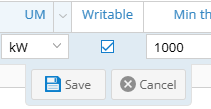
Once you have entered your credentials, you will need to modify the device by enabling writing to the desired tags (signals) (double-click on the signal and check the “writable” box)


Was this helpful?
0 / 0