To properly configure email sending via Azure Communication Services, the following information must be provided.
SMTP Credentials
The following parameters must be provided:
- SMTP Username: the username created according to the format indicated in the previous sections (see 07 – SMTP Username Creation for Azure Communication Services)
- SMTP Password: the password associated with the SMTP username (see 05 – Microsoft Entra ID Configuration)
These credentials are required for authentication with the email sending service.
SMTP Connection Parameters
For the mail server configuration, use the following values:
- SMTP Host: smtp.azurecomm.net
- SMTP Port: 587
- Encryption: TLS (mandatory)
Sender Address
It is also necessary to provide:
Sender Email: the email address configured on the verified domain
This address will be used as the sender for outgoing communications.
To locate the Sender Email, access the Email Communication Services in the Azure portal.
In the left-hand menu, select:
Provisioning Domains
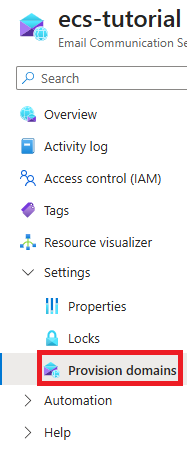
From the list of configured domains, select the desired domain by clicking on it to view its settings and available email addresses.

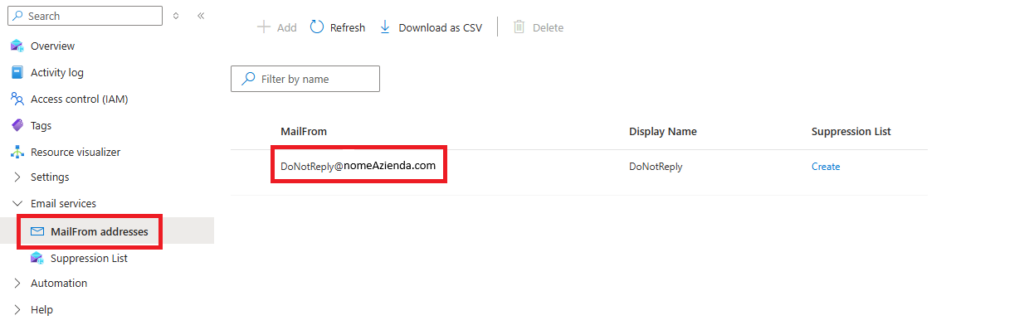
Access the left-hand side panel and search for Mailfrom Address.
Copy the address displayed on the right under Mailfrom.
Credentials Renewal
SMTP credentials have a periodic expiration.
When they expire, it will be necessary to:
- Generate a new SMTP password
- Send the updated SMTP username and the new password to RILHEVA
Without renewing the credentials, email sending will not function properly.
Was this helpful?
0 / 0